BOTVESTING TOOLS
Define your risk.
Determine the scale of your operation.
Calculate lot sizes or stop-loss levels, convert the risk to your currency, and check the margin before applying your strategy to the chart.
Go to the calculatorLot and SL · USD/EUR Account · ProCent Equivalence
The results show the risk budget, the modeled loss, the units, and the pip value. A warning indicates whether the broker's minimum or margin requirements make the position unfeasible. The calculator does not select an entry point or recommend how much to risk.
In this linear Forex model, we first express the risk in the account currency:
Currency risk = balance × percentage / 100
Next, we calculate how much a lot would lose if it hit the stop-loss (SL). The conversion rate indicates how many units of the base currency one unit of the quote currency is worth.
Pip value per lot = units per lot × pip size × conversion factor
Lots = monetary risk / (distance to the stop-loss in pips × pip value per lot)
For the reverse operation:
Distance to the SL in pips = monetary risk / (lots × pip value per lot)
First, convert the pips to price distance: price difference = pips × pip size. For a "Buy" order, that price difference is subtracted from the entry price; for a "Sell" order, it is added. The calculated price is a mathematical limit based on these assumptions, not a recommended technical level.
Volume is rounded down to the nearest step. If it falls below the minimum, zero is displayed as the tradable volume. When calculating the stop-loss (SL), the distance is shortened to the allowed tick. A manually entered tick value replaces the calculated value: pip value = tick value × pip size / tick size.
The distinction between contracts, ticks, and volume restrictions stems from the Official properties of MetaQuotes symbols. The formulas above correspond to the linear model and a fixed exchange rate.
Suppose you have a balance of 10,000 USD and a loss budget of 50 USD, equivalent to 0.5%. These figures are for illustrative purposes only and do not constitute a recommendation. For a buy trade with an entry at 1.10000 and a stop-loss at 1.09500, the distance is 50 pips if one pip is equal to 0.0001.
With 100,000 units per lot and an account in USD, one pip per lot is worth 10 USD. The calculation is 50 / (50 × 10) = 0.10 lots: 10,000 units and a modeled loss of 50 USD. With a lot size of 0.10 and that same budget, the inverse mode returns an SL at 1.09500.
If you enter a take-profit order at 1.11000, the projected profit is $100 and the risk-reward ratio is 2:1, before costs. You can load this scenario by clicking the «Load Example» button.
In the simplified leverage model, margin = lots × contract × entry price × conversion rate / leverage. For the previous example with 1:30 leverage, the estimated margin is $366.67. If there is only $200 available, the risk lot remains 0.10, but the lot size compatible with that margin would be 0.05.
You can also directly specify the margin per lot required by your broker. The MetaTrader Margin Rules These factors include conditions that this estimate does not account for, such as existing positions and symbol settings. A valid result does not guarantee that the broker will accept the order.
The tool supports currency pairs with linear contracts and manual specifications. It does not calculate futures, gold, indices, cryptocurrencies, or inverse contracts. The initial contract, pip, and tick values are for reference only: be sure to check them, especially for pairs involving JPY or symbols with suffixes.
Conversion rates and tick sizes remain fixed throughout the scenario. If they change before the close, the result in the account currency will also change. There are no real-time quotes or connections to your trading account.
The actual loss may exceed the estimate. Spreads, commissions, slippage, gaps, swaps, and order execution are not included. Minimum stop distances, hedging rules, tiered margin, and stop-out levels are also not checked. Check your broker's terms and conditions and The Risks of Trading.
FROM IDEA TO GRAPH
A trade requires you to factor in risk, stop-loss, lot size, tick value, and currencies. Having to do this manually—especially when the account currency doesn't match that of the currency pair—was one of the reasons we developed Botvesting Trading Panel.
BTP uses the account and instrument data in MetaTrader 4 to perform these calculations and conversions. You define where you want your stop-loss (SL) and the risk you’re willing to accept—either as a percentage or in monetary terms—and the panel calculates the corresponding volume. If you’re trading with a fixed lot size, the relationship between lot size, risk, and distance determines the stop-loss (SL). The panel requires this initial data; a percentage alone does not determine a trade.
You can also use your own drawings and lines on the chart to trigger entry and exit points with a predefined risk level. This allows you to incorporate your technical chart patterns into your trade management. You choose the strategy and the conditions; BTP automates their setup and management.
The goal is to align operations with the planned risk. Gaps, slippage, commissions, swaps, spreads, and execution restrictions may cause the actual result to differ. Automated trades require MT4 and BTP to be running on your computer or VPS. Check the settings at the Construction Manual.
Learn About the Botvesting Trading Panel →This calculator uses actual USD or EUR amounts as inputs and also displays their equivalents in cents. For example, 100 USD is 10,000 cents, and a risk of 1 USD is 100 cents. Do not enter 10,000 as your balance if your cent account represents 100 USD.
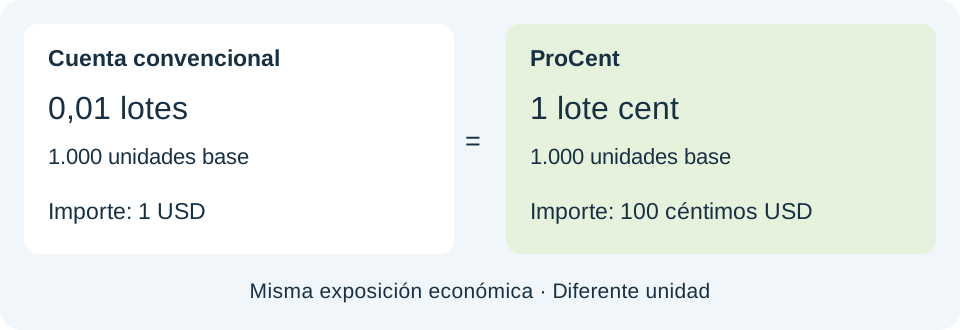
Pro, ECN, and Prime are account types with different terms; they do not, by themselves, change the formula. The ProCent table illustrates the same scenario without re-optimizing the lot size using other minimums or increments. The volume equivalence is shown only for the standard 100,000-unit contract and without a manual tick value.
Check the contract size, pip, tick, minimum volume, tick size, and margin for the instrument on your platform. The RoboForex's official specifications allow you to compare their products by account type. This technical reference is not a recommendation to open an account, nor does it guarantee availability in your country.
For retail clients in Spain, CNMV regulations set a leverage limit of 1:30 for certain currency pairs and 1:20 for all others. The calculator alerts you if the indicated leverage exceeds the limit for that pair. Being able to simulate a value does not mean you can actually trade it. See the CNMV resolution and the terms and conditions of the service provider.
With a contract size of 100,000 units, 1 lot equals 100,000 units, 0.1 equals 10,000, and 0.01 equals 1,000. If your broker uses a different contract size, these equivalencies change. Always enter the specific contract specifications.
The balance alone does not determine the lot size. You also need to consider your chosen risk level, the distance to the stop-loss, the pip value, and the instrument's restrictions. The tool does not recommend a risk percentage.
Yes. Select «Calculate Stop Loss Based on Lot Size,» then specify the entry price, direction, and risk. The system will calculate the distance compatible with that budget and adjust it to the tick. You should check whether that level aligns with your trade and the broker’s rules.
Enter the exchange rate for the quoted currency in EUR. For example, if 1 GBP is worth 1.17 EUR, enter 1.17 for a pair quoted in GBP. The rate appears in the result and is considered fixed; adjust it when your scenario changes.
In this model, the risk-based lot size does not change. The estimated margin changes. If there is insufficient margin, the compatible lot size is displayed separately, without replacing the risk-based lot size.
Compare the conversion rate, tick value, contract size, stop-loss (SL), and step. Here, values are rounded down. Even a small difference in the conversion rate can reduce the volume by one step when it is close to a limit. The volume will not be increased to the minimum if doing so would exceed the budget.
USD/JPY can be calculated by entering your pip and tick sizes and the correct conversion rate. The pair is automatically composed of the base and quote currencies. Platform suffixes do not include specifications. Gold is outside the scope of Forex in this version.
No. The calculation estimates the loss at the indicated price based on the visible assumptions. A gap, slippage, costs, or other execution conditions may affect the actual loss.
Botvesting Team · Model and content reviewed on September 10, 2026.
 Español Español
  English